

The Zoom Control
The Zoom Control allows the user to zoom in and out of plots.
The Zoom Control:
This is what the zoom control looks like:

The Zoom Control Menu:

By clicking on the M, the Zoom Control Menu is shown:
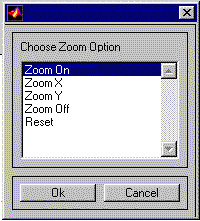
The Zoom Control Menu
- Zoom On – When the plot is clicked on, the plot is zoomed.
- Zoom X – When the plot is clicked on, only the X-axis is zoomed.
- Zoom Y – When the plot is clicked on, only the Y-axis is zoomed.
- Zoom Off – Turns zoom off.
- Reset – Resets the plot’s x and y axis’s back to their original values.
The Zoom Control Panning Buttons:

By clicking on the arrows of the Zoom Control, the plot is panned left, right, up and down.